



 All Models
 Compare Models

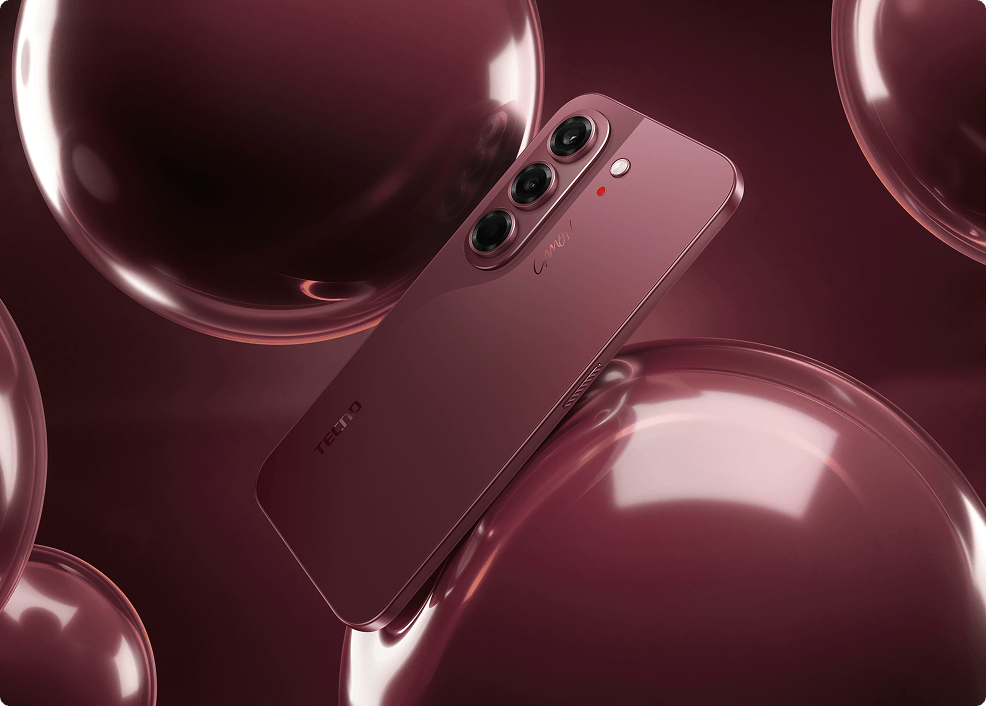 TECNO CAMON Slim 5G in Burgundy Red, featuring a 50MP Sony LYTIA 700C main camera with optical image stabilization and 24mm, 35mm and 50mm portrait options.
To capture more natural-looking portraits with the TECNO CAMON Slim 5G, start with its 50MP Sony LYTIA 700C main camera, choose a portrait framing option that suits your subject, and use soft, even lighting. The phone offers 24mm, 35mm, and 50mm portrait options for different compositions, while optical image stabilization (OIS) helps reduce the effects of small hand movements.
For a more natural appearance, keep beauty or retouching effects low when adjustable controls are available, avoid excessive exposure adjustments, and review details such as skin texture, hair, and facial proportions. The phone provides useful portrait features, but natural-looking results still depend on lighting, shooting distance, processing, and individual preferences.
Why Are Natural-Looking Portraits Difficult for a Phone Camera?
A convincing portrait needs more than a sharp face and a blurred background. The phone must interpret the colour of the light, expose the face without losing the atmosphere and preserve enough texture for the subject to remain recognisable. Mixed lighting makes that harder: a café may combine warm lamps with cool window light, while an evening event may add coloured signs or stage lighting.
Beauty filters add another decision. Smoothing, face reshaping and brightening may suit one person's taste but make another portrait feel artificial. “Natural-looking” is therefore not one fixed effect. It usually means keeping the subject's proportions, visible texture and relationship with the surrounding light believable.
Best Phone for Portrait Photos: What Should You Look For?
The best portrait phone is not necessarily the one with the highest megapixel number. Look at the complete system:
- Main-camera foundation: sensor size, aperture, autofocus and stabilization affect how reliably the camera records the subject.
- Framing choices: different portrait focal lengths let the photographer choose between environmental, half-body and tighter compositions.
- Front and ultrawide cameras: selfies and group portraits need more than the main camera alone.
- Control over processing: natural results are easier when the user can avoid excessive smoothing, brightening or reshaping.
- Real shooting conditions: good light and a sensible camera-to-subject distance still matter, regardless of the phone.
What Does the CAMON Slim 5G's 50MP Sony Main Camera Add?
The CAMON Slim 5G uses a 50MP Sony LYTIA 700C main camera with a 1/1.56-inch sensor, f/1.8 aperture, 23mm focal length and OIS. The sensor and wide aperture provide a stronger technical base for collecting light, while OIS can help reduce the effect of small hand movements during handheld shooting.
That matters for portraits because small losses of sharpness are easy to notice around the eyes, hair and clothing. OIS cannot freeze a moving subject or replace good lighting, but it can help the camera start from a steadier image. The final result still depends on the scene, software processing and how the photo is taken.
 Official TECNO image captured with Super-Zoom FlashSnap at 2× zoom for tighter portrait framing. The 2× view should not be described as a dedicated optical telephoto camera.
Why Do 24mm, 35mm and 50mm Portrait Options Matter?
Portrait photography is not one composition. TECNO provides 24mm, 35mm and 50mm portrait options so the photographer can decide how much of the person and environment should be included.
| Portrait option | Useful for | How to use it naturally |
|---|---|---|
| 24mm | Environmental portraits, travel and full-body shots | Keep the subject away from the extreme edges and avoid placing the phone very close to the face. |
| 35mm | Balanced everyday portraits | Use it when the person and surroundings both matter, such as cafés, streets or events. |
| 50mm | Tighter face and upper-body framing | Step back slightly for a more comfortable facial perspective and a less crowded background. |
 Official TECNO image captured with the 35mm Multi-Focal Length Portrait option, balancing the subject with the surrounding scene.
These are portrait-mode framing options, not three separate rear portrait lenses. Their value is creative flexibility: the photographer can choose a composition instead of forcing every face into the same wide-angle view.
What Phone Takes Natural-Looking Portraits Without Heavy Beauty Filters?
The CAMON Slim 5G can be used for more natural-looking portraits when the photographer combines its main camera and portrait focal-length options with restrained processing. TECNO's Philippine product page confirms the camera hardware and portrait modes, but it does not publish a universal “natural skin tone” accuracy score or promise identical colour under every light.
For a less processed look:
- 1. Check beauty or retouching controls before shooting. If the current Camera app provides smoothing, reshaping or skin-brightening controls, set them to zero or a low level. The exact controls and tap sequence may vary by software version.
- 2. Start with the main camera. The 50MP Sony LYTIA 700C main camera features a 1/1.56-inch sensor, an f/1.8 aperture, and optical image stabilization (OIS). It provides the phone's primary rear-camera hardware for portrait photography, although actual results still depend on lighting, focus, and image processing.
- 3. Use 35mm or 50mm for closer portraits. These options can reduce the need to hold a wide camera very close to the face.
- 4. Choose soft, even light. Window light, open shade or a bright overcast sky can be more flattering and easier for a phone to interpret than mixed or strongly coloured lighting.
- 5. Protect highlights. If the face looks too bright, tap the subject and reduce exposure slightly rather than trying to repair lost detail later.
- 6. Review texture, not just brightness. Zoom into the eyes, hairline and skin on the 6.78-inch AMOLED display before deciding whether the portrait looks natural to you.
A Three-Scene Test for Natural-Looking Portraits
To evaluate natural-looking portrait results with the TECNO CAMON Slim 5G, photograph the same subject in three different lighting conditions:
- 1. Soft daylight: Take a portrait beside a window or outdoors in open shade. Check whether skin texture, hair, and facial details remain natural.
- 2. Mixed indoor lighting: Photograph someone in a café or room with warm and cool light sources. Compare the appearance of skin tones, shadows, and highlights.
- 3. Evening or low light: Capture a portrait in a dimly lit environment using the main camera and an appropriate shooting mode. Review facial sharpness, exposure, and background details.
Where available, compare images with beauty settings reduced and with the preferred default settings. Examine the original files at full size to determine which settings produce the most natural-looking results.
What About Self-Portraits and Group Photos?
The 32MP front camera supports selfies, group selfies and video calls. A higher pixel count provides more image information for framing and cropping, although it does not guarantee natural skin tones by itself. Keep the phone at a comfortable distance, use soft light and reduce any beauty settings if you want visible texture.
 Official TECNO image showing a group selfie captured with the CAMON Slim 5G's 32MP front camera.
For a group photographed from behind the phone, the 8MP autofocus ultrawide camera offers a 112-degree field of view. It can fit more people or more of the location into the frame. Keep faces away from the extreme corners when possible, because ultrawide perspective can stretch subjects near the edges.
Can the CAMON Slim 5G Take Natural-Looking Portraits at Night?
The 50MP main camera's 1/1.56-inch sensor, f/1.8 aperture and OIS provide useful hardware for lower-light photography. TECNO also lists Super Night Mode and an Advanced Flash System. These tools can help in difficult scenes, but night portraits remain sensitive to subject movement, coloured lights and exposure choices.
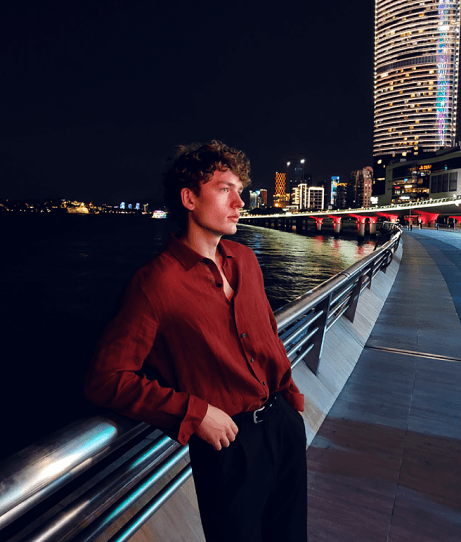 Official TECNO night portrait image captured using Super Night Mode, supported by the 50MP Sony LYTIA 700C main camera.
For a more believable night portrait, avoid placing the subject directly under a harsh overhead light, hold the phone steady and take more than one frame. If a flash changes the atmosphere too much, look for a nearby continuous light source and compare both versions.
CAMON Slim 5G Portrait Camera Specifications
| Feature | Official specification | Portrait value |
|---|---|---|
| Main camera | 50MP Sony LYTIA 700C; 1/1.56-inch; f/1.8; 23mm; OIS | Primary hardware for detailed, steadier handheld portraits. |
| Portrait options | 24mm, 35mm and 50mm | Supports environmental, balanced and tighter compositions. |
| Ultrawide camera | 8MP AF; 14mm; f/2.2; 112° field of view | Useful for group portraits and scenes where the setting matters. |
| Front camera | 32MP | Supports selfies, group selfies and video calls. |
| Display | 6.78-inch AMOLED; hardware-level 1.5K; up to 144Hz | Provides a large screen for checking framing and visible detail. |
| Storage | 128GB or 256GB | Provides room for portrait libraries and edited copies. |
TECNO states that the T1 display chip upscales the GPU's native 1080 × 2364 output to the panel's 1208 × 2644 resolution, so some third-party apps may report 1080p. Screen settings and ambient light can also change how a portrait appears during review.
Natural Does Not Mean Identical in Every Situation
No camera phone can reproduce every complexion exactly the same way under every light. White balance, exposure, local colour, display calibration, software version and personal preference all affect how a portrait is perceived. That is why “best” and “most natural” should not be treated as universal rankings without controlled comparison tests.
The CAMON Slim 5G's advantage is the flexibility of its portrait system: a stabilized 50MP main camera, three portrait focal-length options, an autofocus ultrawide camera and a 32MP front camera. Used with careful lighting and restrained retouching, those tools give photographers more control over how the subject is represented.
Frequently Asked Questions
What is the best phone for portrait photos?
There is no independently established winner for every person, budget and lighting condition. The TECNO CAMON Slim 5G is a strong portrait-focused option in the Philippines because it combines a 50MP OIS main camera with 24mm, 35mm and 50mm portrait choices, an autofocus ultrawide camera and a 32MP front camera.
How Can I Check Portrait Quality in Different Lighting Conditions?
Photograph the same subject in soft daylight, mixed indoor lighting, and evening or low light. Compare skin texture, hair, facial detail, highlights, shadows, and background detail in the original files at full size. Where controls are available, also compare reduced beauty settings with the preferred default settings.
Which CAMON Slim 5G focal length is best for portraits?
Use 24mm when the environment is part of the story, 35mm for balanced everyday portraits and 50mm for tighter face or upper-body framing. The best choice depends on the composition and available space.
Does the CAMON Slim 5G have optical image stabilization?
Yes. Its 50MP main camera includes OIS, which can help reduce the effect of small hand movements. It does not freeze a moving person, so subject movement can still cause blur.
Can it take group portraits?
Yes. The 8MP autofocus ultrawide camera has a 112-degree field of view, while the 32MP front camera can be used for group selfies. Keep faces away from the extreme edges of an ultrawide frame when possible.
Final Verdict: Taking Natural-Looking Portraits with the TECNO CAMON Slim 5G
The TECNO CAMON Slim 5G offers several features for portrait photography, including a 50MP Sony LYTIA 700C main camera with OIS and 24mm, 35mm, and 50mm portrait framing options. These allow users to experiment with environmental portraits, everyday compositions, and tighter face or upper-body shots.
For more natural-looking results, prioritize good lighting, appropriate camera distance, restrained beauty settings, and careful exposure. Rather than relying entirely on automated processing, use the available camera options to create portraits that suit the subject and scene.
The CAMON Slim 5G is worth considering for users who value flexible portrait framing in a slim smartphone, but the final appearance of skin tones, texture, and background blur should be evaluated using original photographs.
Explore the TECNO CAMON Slim 5G official product page and check the latest Philippine price, availability, configurations and offers through TECNO Philippines' official channels.
Official Product Sources
TECNO Philippines: CAMON Slim 5G product pageTECNO Philippines: CAMON Slim 5G technical specifications