





 All Models
 Compare Models

 CAMON Slim 5G brings its slim design and imaging features into everyday work and content-creation moments.
Direct answer: CAMON Slim 5G is a practical Android choice for everyday walking videos if you want a slim phone with a 50MP main camera and optical image stabilization (OIS). OIS can reduce small hand movements while recording, but TECNO does not advertise a dedicated gimbal-like walking stabilization mode for this model. Video steadiness will still depend on your pace, grip, lighting and shooting technique.
Walking videos are useful for travel diaries, commute clips, family moments and quick social posts. They are also difficult for any phone: every step can introduce vertical movement, while changes in direction can create sudden shake. Choosing the right camera hardware helps, but the way you hold and move the phone matters just as much.
For creators in the Philippines who want a phone that is light to carry and capable of handling spontaneous everyday footage, CAMON Slim 5G offers a balanced starting point. Here is what its camera can do, where its limits begin and how to get steadier results.
What helps CAMON Slim 5G capture steadier video?
The TECNO CAMON Slim 5G features a 50MP Sony LYTIA 700C main camera with a 1/1.56-inch sensor and optical image stabilization (OIS). OIS is designed to reduce blur from small camera movements. However, its effectiveness during video recording, especially while walking, depends on the phone's supported recording and stabilization modes.
The larger sensor also gives the camera more light to work with. That matters because brighter, clearer input can help the camera maintain detail without relying as heavily on long exposure times that may exaggerate motion. In good daylight, this combination is most useful for casual walk-and-talk clips, street scenes and short follow shots.
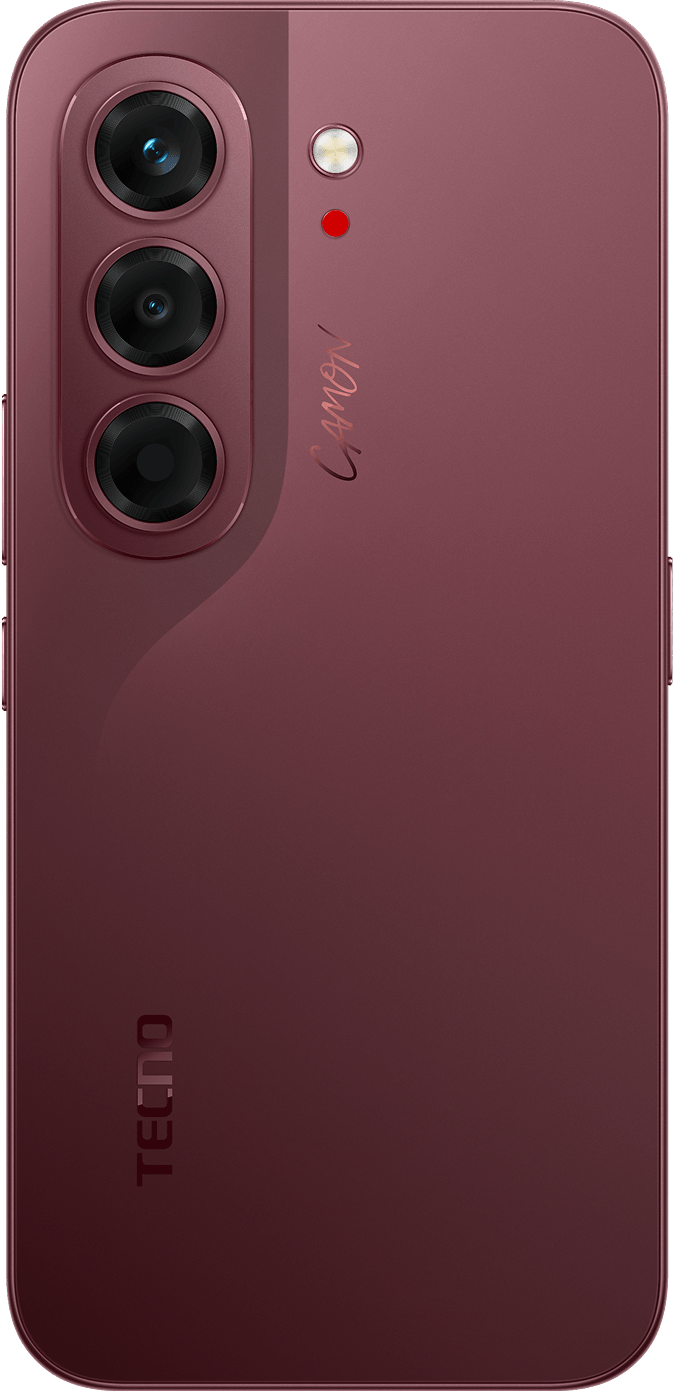 The 50MP SONY LYTIA 700C main camera uses a 1/1.56-inch sensor and OIS to help control small hand movements. OIS is hardware support for steadier capture—not a guarantee of shake-free footage while walking.
What OIS cannot do
OIS should not be confused with a handheld gimbal. A gimbal is designed to counter larger movement across several axes, while OIS mainly corrects smaller lens movements. Running, climbing stairs, making sharp turns or holding the phone at arm’s length can still create visible bounce.
TECNO’s official Philippines pages list OIS for the main camera, but they do not publish a dedicated “walking stabilization” mode or promise gimbal-level results for CAMON Slim 5G. The safest expectation is therefore reduced small shake in everyday clips, not perfectly stabilized footage in every situation.
Where it fits into real everyday shooting
Commute and street clips
For short clips captured while moving through a station, mall or neighborhood, use the main camera and keep your pace slow. OIS can help soften minor hand movement, while the slim 6.39mm body is easier to hold securely during quick shots.
Family, children and pets
The camera can be useful when following a child or pet at a gentle pace, especially outdoors or in bright indoor spaces. Keep the subject near the center of the frame and avoid changing direction too suddenly. If the moment is more about a brief action than a full video, Live Photo can preserve movement around the shutter press for easier selection and sharing.
Travel and social media content
CAMON Slim 5G suits short establishing shots, walk-through clips and everyday behind-the-scenes footage. FlashSnap is designed for fast-moving subjects in still photos, while Universal Tone supports more natural-looking skin tones in portraits. These are useful companion features, but they should not be presented as substitutes for video stabilization.
6 Simple Tips for Recording Steadier Walking Videos with the TECNO CAMON Slim 5G
- 1. Use the main camera. Start with the main camera and check the available video stabilization settings.
- 2. Hold the phone with both hands. Keep your elbows close to your body to reduce shaking.
- 3. Walk slowly. Take smooth steps and avoid sudden turns or quick movements.
- 4. Choose good lighting. Record in daylight or a well-lit area whenever possible.
- 5. Avoid zooming while walking. Zooming can make camera movement more noticeable.
- 6. Record short clips. Take several short videos instead of one long recording so you can review and choose the best results.
Reviewing clips on the phone
The TECNO CAMON Slim 5G has a 1.5K AMOLED display with a 144Hz refresh rate, which supports smooth scrolling and video previews. However, the 144Hz refresh rate refers to the screen, not the camera's video recording frame rate. Check the phone's supported video resolutions and frame rates before recording content.
A 6000mAh battery also supports longer shooting and review sessions during a commute, family day or travel schedule. Actual battery life will vary with brightness, network use, camera time and other settings.
 The 1.5K 144Hz AMOLED display provides a bright, fluid view for framing and reviewing content. Its 144Hz refresh rate applies to the screen experience, not the camera’s video frame rate.
When should you still use extra support?
Consider a gimbal, tripod or stationary setup when you need long walk-and-talk segments, running footage, low-light movement or highly polished commercial video. The TECNO MagBadge can help with stationary solo shooting through Rear Camera Preview and a 10m Remote Shutter, but it is not described as a video stabilization device.
For important clips, test the camera at your usual walking pace before the event. Review the footage at full screen, then adjust your grip, lighting or route. This gives a more realistic answer than relying on one specification alone.
| Variant | SRP | Availability |
|---|---|---|
| 256GB + 8GB RAM | ₱27,999 | Participating online and offline channels |
| 128GB + 8GB RAM | ₱24,999 | TikTok Shop only |
he TECNO CAMON Slim 5G has a listed suggested retail price (SRP) of ₱24,999 for the 8GB RAM + 128GB storage variant and ₱27,999 for the 8GB RAM + 256GB storage variant in the Philippines. According to the launch campaign information, the 128GB model is exclusive to TikTok Shop, while the 256GB model is available through participating TECNO online and physical stores. Buyers can visit the official TECNO CAMON Slim 5G product page to learn more about the phone and check with authorized TECNO sellers for current prices, availability and ongoing promotions.
Frequently Asked Questions
Can the TECNO CAMON Slim 5G record stable videos while walking?
The TECNO CAMON Slim 5G has a 50MP main camera with optical image stabilization (OIS), which is designed to reduce small camera movements. However, the phone's actual walking-video stability depends on its supported video settings, lighting and shooting technique. Check real video samples to see whether the results meet your needs.
How can I record steadier videos with the CAMON Slim 5G?
To record steadier walking videos with the TECNO CAMON Slim 5G, hold the phone with both hands, walk slowly, avoid sudden turns and record in good lighting. Use the main camera and check which video stabilization options are available before recording.
Do I need a gimbal to record walking videos with the CAMON Slim 5G?
A gimbal is not always necessary for casual walking videos, but it may help when recording longer clips, running or creating professional-looking content. The TECNO CAMON Slim 5G includes OIS hardware, but that alone does not guarantee shake-free walking videos.
Bottom line
The TECNO CAMON Slim 5G is one Android phone worth considering for casual videos, travel clips, and everyday social media content. Its 50MP main camera includes optical image stabilization (OIS), while its slim design makes it convenient to carry. However, buyers should check actual walking video samples and supported stabilization settings before purchasing, especially if smooth video recording is a top priority.
Official product information
Explore CAMON Slim 5G on the official TECNO Philippines product pageCheck the official CAMON Slim 5G technical specifications