




 All Models
 Compare Models

Clicking pictures is one thing, and editing them to perfection is another. It used to be such a tiring process; you had to sit at the computer and learn complicated software in order to do a simple color balance in your pictures. So many people just post the untouched photos to skip this process altogether.
AI Studio on the TECNO CAMON 50 Pro changes that. Everything from removing unwanted elements to turning a still photo into a dynamic video happens directly on the phone in seconds, with no editing experience required. Here is a breakdown of what this budget camera phone can do for you.
What Is TECNO AI Studio?
AI Studio is TECNO's built-in creative suite on the CAMON 50 Pro. It brings together a set of AI-powered tools designed to improve, transform, and reimagine your photos and videos after they are taken.
It is not a filter pack. Each tool solves a specific problem that photographers and content creators run into regularly, and it does it automatically without requiring manual skill or software knowledge.


AI LightMaster 2.0
Lighting is the hardest part of photography to control. Reflections off glass, lens flare from bright sunlight, harsh shadows falling across a face, these are problems that ruin otherwise good photos.
AI LightMaster 2.0 has three separate tools to fix them. The Flare Remover cleans up sun glare and light streaks. The Reflection Remover eliminates glass reflections from windows and screens. The Shadow Remover lifts unwanted shadows from faces and backgrounds. All three work after the shot, which means you do not have to reshoot. You just fix it.
For the best budget phone with good camera capabilities, having post-capture tools this precise is genuinely uncommon at this price point.
AI Image-to-Video Generator
A still photo captures one moment. The AI Image-to-Video Generator turns that moment into a short, dynamic clip with natural motion added by the AI.
You do not need to record a video. You do not need editing software. You select the photo, apply the generator, and the AI animates it into something that feels alive. For social media content, family memories, or travel photography, this changes what a single photo can become.
3D PhotoSpace
3D PhotoSpace converts a flat image into a three-dimensional scene. The AI reads the depth information in the photo and adds dimension to it, making the subject pop off the background in a way a standard photo cannot.
The result works particularly well for portraits, travel shots, and any photo with a strong foreground and background separation. One tap and the photo becomes something noticeably different from what you started with.
AI Art Gallery
AI Art Gallery applies cultural art styles from around the world to your photos. A portrait shot in Lahore can be rendered in the style of Japanese ink painting or European oil on canvas. A landscape from northern Pakistan can take on a completely different visual identity.
It is a creative tool that works best when you want to do something genuinely different with a photo rather than just clean it up.
One-Tap AI Key
All of these tools are accessible through the dedicated One-Tap AI Key on the side of the CAMON 50 Pro. A single press opens AI Studio. A long press activates Ella, the built-in AI assistant.
Having a physical hardware key for AI access changes how naturally you use these tools. They are not buried in a menu. They are one press away, which means you actually use them rather than forgetting they exist.
The Battery That Keeps It All Running
Creative work drains power. Generating videos, processing 3D transformations, and running AI tools on high-resolution images all demand consistent performance from both the processor and the battery.
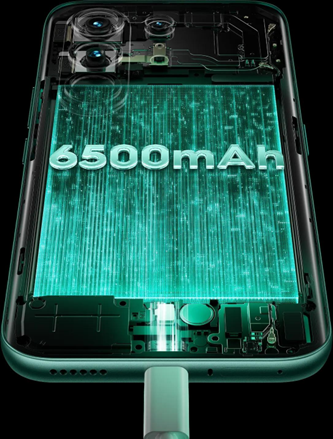
The CAMON 50 Pro carries a 6500mAh battery with 45W fast charging. After 1,800 charge cycles, it still retains over 80 percent of its original capacity, backed by TÜV SÜD certification. For anyone looking for the best battery mobile phone that also delivers serious creative AI tools, this combination is hard to find elsewhere.
The MediaTek Helio G200 Ultimate handles every AI process instantly. No lag, no waiting, just results.
Creativity Without the Learning Curve
AI Studio on the CAMON 50 Pro is built for people who want great results without spending time learning how to get them. Whether you are fixing a photo, transforming it into a video, or applying an art style, every tool works with one tap.
For anyone searching for the best affordable camera phone that goes beyond just taking photos, the CAMON 50 Pro delivers a full creative suite right in your pocket.
Explore the TECNO CAMON 50 Pro and see what AI Studio can do for your photography.